Wednesday, 8 April 2015

At last! 1&1 SRV DNS records - with invalid characters warning when creating _autodiscover for Exchange


1and1 finally add SRV records to the DNS
I can't tell you how long I've wanted 1&1 to allow SRV records in the DNS editor - since Exchange 2007 ... and its 2015 now, must have been really really hard to implement ;-)

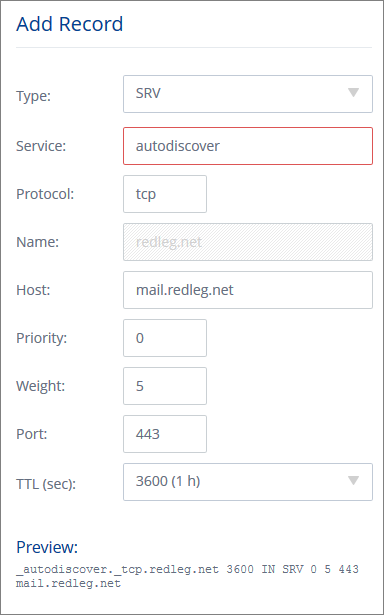
So login to 1and1 and go to the new Domain Centre, choose your domain and click Edit DNS Settings. At the bottom under 'TXT, SPF and SRV Records' click Add Record. It looks like this picture.

The standard advice is to create a record with this info:
   Service: _autodiscover
   Protocol: _tcp
   Port Number: 443
   Host: remote.yourdomain.com

However if you add _autodiscover you'll get an error ... This field contains invalid characters. The following characters are valid: 'a-Z', '0-9', '*', '-', '+'.

The trick is to remove the underscore at the start for both autodiscover and tcp. If you look at the preview at the bottom, 1and1 are automatically adding the underscore. 

Also note you need to click Add and then click Save, to create the record.

Monday, 23 March 2015

Reclaim lots of disk space from Microsoft Zune / Windows Phone .tmp files

The laptop just shouted about having low disk space, only 100MB remaining. So I started poking around to find out what I could free up - really didn't expect to discover that a big culprit was Microsoft Zune.

Zune was using around 15GB for its Transcoded Files Cache - consisting of 5000+ .tmp files. You can find this folder in
C:\USERS\username\APPDATA\LOCAL\MICROSOFT\ZUNE

Select All (Ctrl-A) to highlight them all, then Shift-Del to permanently delete (bypassing the Recycle Bin).

The files have come from a Windows Phone being connected and syncing media files between laptop and phone.

Monday, 16 March 2015

Shared printer keeps going offline after a few minutes on Windows Server

Sometimes its just the simple things ... AND you keep forgetting the fix. The copier company has just been and installed a shiny new Toshiba, looks loverly. Installed x86 / x64 drivers on the server, setup the printers, shared on the network, installed on a couple of PCs and watched as the printers promptly went offline again.

Restart the Print Spooler, come back online, wait a few minutes, and they're offline again. Aaargh.

Oh yes the fix - right-click on the server printer and choose Properties (or Printer Properties on newer versions of Windows Server) find the Ports tab, click Configure Port and

make sure SNMP is turned OFF

Thursday, 19 February 2015

Draytek 2820 not connecting to Vigor 120 ADSL modem on WAN2, no response from server

Got a DrayTek Vigor 2820 router on the latest 3.3.7.5 firmware. We've got Plusnet connected using the ADSL WAN 1 port, which works fine. However WAN2 was connected to a Technicolor TG582n in ethernet bridged mode to ZEN broadband. WAN2 started dropping randomly and we couldn't pin down why.

We swapped a Draytek Vigor 120 ADSL modem (3.2.6.1) in place of the Technicolor. Line sync was ok, in fact faster than the TG582n, esp the uplink which doubled up from 512k to 1Mbps. Bonus! However it wouldn't connect from the 2820 router using the WAN2 PPPoE setup. This is a PPPoE to PPPoA bridged mode.

On the Online Status > Physical Connection you could see the PPP connection starting, but followed by a 'No response from the server' error.

Took a little while to identify - make sure the Vigor 120 modem has DHCP enabled on the LAN screen. Doh!


Wednesday, 11 February 2015

Windows 8.1 Hyper-V requires SLAT, is my Intel CPU supported?

I was having a bit of trouble tracking down if there was a suitable CPU upgrade for an old Core 2 E7300 that would support Hyper-V on Windows 8.1. The option to enable it in Programs and Features was greyed out. You an see the message here "Hyper-V cannot be installed: The processor does not have required virtualisation capabilities."

Turns out the CPU needs to support SLAT - Intel call their version, Extended Page Tables (EPT). Its not enough having Intel VT or VT-x or VT-d, it needs to be 'VT-x with EPT'.

Roughly speaking, you need an i3, i5, i7 or equivalent Xeon CPU for EPT support. None of the Core 2 CPUs had it present.

For a more definitive answer, you can bring up a full list of supported CPUs with this search of Intel's ARK library http://ark.intel.com/search/advanced?s=t&ExtendedPageTables=true


Thursday, 5 February 2015

Unable to send email from SBS 2008 Task Scheduler when Event Viewer Audit Failure, error 2147746321

I wanted an SBS 2008 server (which is essentially Windows Server 2008) to email me if there was a login failure recorded. So if someone types the wrong password, or more importantly, starts trying to guess a password, I'll get a notification.

The Event Viewer should let you attach a task to a particular event id, in this case Audit Failure Event ID 4625. Find one in the event viewer (using Filter Current Log > keywords > Audit Failure) then right-click and Attach Task.

Except no matter how many combinations of user/SYSTEM account, Run whether user is logged in or not, highest privileges and then messing with the from field and the smtp server (including a second receive connector on a different port), localhost vs ip vs 127.0.0.1 ... it just wouldn't send an email. I couldn't even see in the Transport Roles verbose logging what was happening. The only hint was in the Task properties under history which showed error 2147746321. That didn't Google to anything that fixed the problem.


So I gave up on that plan.

And decided to attach a script instead, dead simple, ran first time. So open notepad and paste this script in

Set objMail = CreateObject("CDO.Message")
Set objConf = CreateObject("CDO.Configuration")
Set objFlds = objConf.Fields
objFlds.Item("http://schemas.microsoft.com/cdo/configuration/sendusing") = 2
objFlds.Item("http://schemas.microsoft.com/cdo/configuration/smtpserver") = "SERVER1"
objFlds.Item("http://schemas.microsoft.com/cdo/configuration/smtpserverport") = 25
objFlds.Update
objMail.Configuration = objConf
objMail.From = "administrator@acmecleaning.co.uk"
objMail.To = "support@redleg"
objMail.Subject = "Security audit failure (Acme Cleaning)"
objMail.TextBody = "Please check the security log on SERVER1 at Acme Cleaning."
objMail.Send
Set objFlds = Nothing
Set objConf = Nothing
Set objMail = Nothing
Save the file as "security-warning.vbs" into somewhere handy like c:\users\administrator and change the task action from send email to run a program, point it at that script.

Oh and you'll need to update the script with your server, from email address and to email address.

Note that the sending port is the default 25 in this example which doesn't allow internal smtp by default. You might want to create another Receive Connector in Exchange Management Console > Server Config > Hub Transport using another port, eg 25025 and allow anonymous internal email via that instead.

Friday, 30 January 2015

Did someone say Mouse !?

Contrary to rumours, I'd just like to confirm I fixed the iMac to capture VHS video, not the cat. I did get help, a lot of help.

Tuesday, 20 January 2015

DrayTek Vigor 2820 ADSL monitoring with SNMP, whats the line speed OID

One client with a DrayTek Vigor 2820n internet router has a problem with the ADSL upload speed slowing down to around 40-50% of normal on occasion. It has a big impact because there are staff out in the field needing to VPN in to the office to update the main database.

To keep an eye on performance we added SNMP monitoring to the Centrastage console for that client, with an alert to trigger if it fell below 80%. The upload line speed is typically just under 1.2Mbps with the Annex M fast upload option we have on that line. It seems to fluctuate 5-10% in normal operation anyway - possibly some dodgy wiring or just being quite a way from the exchange.

The key element of SNMP monitoring is knowing what object identifier (OID) to monitor. We used snmpwalk to dump them all out to CSV. Then matched the known line speed values to the relevant OIDs:
 .1.3.6.1.2.1.2.2.1.5.4  --- ADSL download line speed
 .1.3.6.1.2.1.10.94.1.1.5.1.2.4  --- ADSL upload line speed

DrayTek have a list of some useful Vigor router OIDs

Have you got any other useful parameters or OIDs to monitor on a DrayTek router ?


Saturday, 10 January 2015

MODx Evolution 'Access Denied' to directory in assets\files

Moved a MODX Evo website to a new server, which went pretty smoothly with the standard instructions. However any user trying to access one of the directories under assets/files where all the reports etc are stored constantly got an Access Denied error.

This occurred when going into Elements >  Manage Files

If you're looking closely, you can see the directory 'Test' in this image has been truncated to 'est'. Interesting.

Tracked the fault down to an extra slash in the File Manager path. Go into Tools > Configuration > File Manager and look at the first field, titled File Manager path, see pic.

I had to remove the slash between the [(base_path)] and assets, so the entry should read [(base_path)]assets/files

HTH


Monday, 22 December 2014

MODX Evo server move causes error about unspecified timezone in PHP

Having just moved a MODX Evolution based website from the old server to a 1and1 VPS, we started getting errors about not specifying a timezone in PHP. Tried several suggestions around updating htaccess but no luck.

Adding this line to the index.php did the trick.

ini_set("date.timezone", "Europe/London");

Apparently its because the default PHP setting on the 1&1 VPS is to use Fast CGI


Trust 1&1 Internet for your domain name registration, from only £1.99/year!. Check now!