Showing posts with label SBS2008. Show all posts

Sunday, 9 December 2018

0x800F081F can’t install Microsoft .NET Framework 3.5 in Windows 10

Had a few instances of installing specific business software or older programs that get a prompt in Windows 10 that .Net 3.5 will be required. They'll either try and add it and fail or you'll attempt to manually install it from the Windows Features section of Control Panel > Programs.

Often you get error 0x800F081F saying that the source files could not be found.

We've regularly seen this in a Windows Small Business Server environment, eg SBS 2008 or SBS 2011. The key fact here is that there's an on-site WSUS server providing local Update Services. Unfortunately it doesn't have the download available for .NET 3.5 for Windows 10 Pro.

There are several recommended fixes involving using a Windows 10 USB installer or downloading the Windows 10 ISO - not always practical on a remote support session - and they don't always seem to work. The best fix and the simplest option we've found to be effective is s asmall registry change, which tells Windows to contact Microsoft directly for Features and Repairs, and not use WSUS.

Use Windows-R for a Run box or type directly into the Cortana Search or Start menu,
   gpedit.msc
which should let you Edit Group Policy, see image above.

Look in Computer Configuration > Administrative Templates > System, for the setting 'Specify settings for optional component installation and component repair'

Turn it to Enabled and tick the box 'Download repair content and optional features directly from Windows Updates instead of Windows Server Updates Services (WSUS)'

You might need to start a CMD prompt (use Window-R again) and type 'gpupdate /force' to get the new setting to be applied immediately.

Wednesday, 1 August 2018

Buffalo DriveStation backup error on SBS Server 2008 (msexchangeis 9782, error code '2155348010')

Attaching a new Buffalo Drivestation 3TB Velocity USB 3.0 backup drive (HD_LXU3) to an old Windows Server 2008, which is part of Small Business Server 2008, reminded us of an error we'd not seen for a few years.

The standard Windows Server backup failed to run within a couple of minutes, despite having been configured for the new drive.


The Event Log showed an Exchange error from source msexchangeis with event id 9782. This was a little misleading, because all the exchange esetuil diagnostics and repairs will show no fault. A little further on in the event viewer you might also see an error that the backup failed with following error code '2155348010' and event id 517, which is a little more useful.

The fault lies with the fact that the Server 2008 Backup doesn't support larger capacity drives with the newer Advanced Format using 4096 byte sectors. It will only backup to a drive formatted with 512 byte sectors. Note that this is referring to the drive format sector size, not the volume or partition sector size.

If you're lucky, the USB drive you've bought had a download that will allow you to reformat the drive. Western Digital (WDC) have the WD Quick Formatter utility. More background detail and a link in this thread https://social.technet.microsoft.com


Buffalo have a similar utility, but its not available on the UK support page! Instead, if you head over to their Japanese support page http://buffalo.jp/support_ap/support/products/hd_lxu3.html and download the DriveFormatter2 program (its in English), you can reformat with 512 byte sectors. Select the correct drive and choose option 2: NTFS (Win 8, 7, Vista)


Sunday, 26 March 2017

SBS 2008 Best Practice Analyzer (SBS BPA) out of date, error ocurred trying to access the web

The Best Practice Analyzer (BPA) for Small Business Server 2008 (SBS2008) reports 'An error occurred trying to access the web' when it tries to update.


If you click on the 'About the Best Practices Analyzer' link you might see an older update than Configuration File version: 2.1.60.0


[ We had an SBS 2008 server that blue screened and had to be restored using a SystemState backup and SFC system file check - somewhere along the way we ended up with an old configuation file version of 2.1.5.0. When run, this threw up an error about WSUS 3.0 needing SP1, when SP2 was actually installed. ]

You can manually update by copying a newer SBSBPA.CONFIG.XML file into the C:\Program Files (x86)\SBSBPA\en directory.


Monday, 2 November 2015

SBS 2008 BPA 'log file for the Windows SharePoint Services configuration database is getting large' LinkId=159745


We were running out of disk space on a Small Business Server 2008, giving us Exchange back pressure problems halting email delivery. The SBS2008 Best Practices Analyzer (BPA) reports that 'The log file for the Windows SharePoint Services configuration database is getting large'. For information about how to reduce the size of the log file, see the Knowledge Base at http://go.microsoft.com/fwlink/?LinkId=159745

Unfortunately that link is now dead, 'This page doesn't exist' and searching MS fails to show the relevant info to fix the problem.

The Microsoft FixIt however is still available for an automatic fix, use this link
http://go.microsoft.com/?linkid=9774317

Gave me an extra 8GB of disk space within seconds.

Wednesday, 8 April 2015

At last! 1&1 SRV DNS records - with invalid characters warning when creating _autodiscover for Exchange


1and1 finally add SRV records to the DNS
I can't tell you how long I've wanted 1&1 to allow SRV records in the DNS editor - since Exchange 2007 ... and its 2015 now, must have been really really hard to implement ;-)

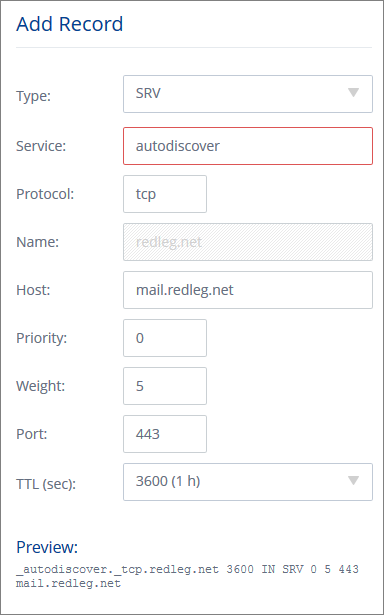
So login to 1and1 and go to the new Domain Centre, choose your domain and click Edit DNS Settings. At the bottom under 'TXT, SPF and SRV Records' click Add Record. It looks like this picture.

The standard advice is to create a record with this info:
   Service: _autodiscover
   Protocol: _tcp
   Port Number: 443
   Host: remote.yourdomain.com

However if you add _autodiscover you'll get an error ... This field contains invalid characters. The following characters are valid: 'a-Z', '0-9', '*', '-', '+'.

The trick is to remove the underscore at the start for both autodiscover and tcp. If you look at the preview at the bottom, 1and1 are automatically adding the underscore. 

Also note you need to click Add and then click Save, to create the record.

Monday, 16 March 2015

Shared printer keeps going offline after a few minutes on Windows Server

Sometimes its just the simple things ... AND you keep forgetting the fix. The copier company has just been and installed a shiny new Toshiba, looks loverly. Installed x86 / x64 drivers on the server, setup the printers, shared on the network, installed on a couple of PCs and watched as the printers promptly went offline again.

Restart the Print Spooler, come back online, wait a few minutes, and they're offline again. Aaargh.

Oh yes the fix - right-click on the server printer and choose Properties (or Printer Properties on newer versions of Windows Server) find the Ports tab, click Configure Port and

make sure SNMP is turned OFF

Thursday, 5 February 2015

Unable to send email from SBS 2008 Task Scheduler when Event Viewer Audit Failure, error 2147746321

I wanted an SBS 2008 server (which is essentially Windows Server 2008) to email me if there was a login failure recorded. So if someone types the wrong password, or more importantly, starts trying to guess a password, I'll get a notification.

The Event Viewer should let you attach a task to a particular event id, in this case Audit Failure Event ID 4625. Find one in the event viewer (using Filter Current Log > keywords > Audit Failure) then right-click and Attach Task.

Except no matter how many combinations of user/SYSTEM account, Run whether user is logged in or not, highest privileges and then messing with the from field and the smtp server (including a second receive connector on a different port), localhost vs ip vs 127.0.0.1 ... it just wouldn't send an email. I couldn't even see in the Transport Roles verbose logging what was happening. The only hint was in the Task properties under history which showed error 2147746321. That didn't Google to anything that fixed the problem.


So I gave up on that plan.

And decided to attach a script instead, dead simple, ran first time. So open notepad and paste this script in

Set objMail = CreateObject("CDO.Message")
Set objConf = CreateObject("CDO.Configuration")
Set objFlds = objConf.Fields
objFlds.Item("http://schemas.microsoft.com/cdo/configuration/sendusing") = 2
objFlds.Item("http://schemas.microsoft.com/cdo/configuration/smtpserver") = "SERVER1"
objFlds.Item("http://schemas.microsoft.com/cdo/configuration/smtpserverport") = 25
objFlds.Update
objMail.Configuration = objConf
objMail.From = "administrator@acmecleaning.co.uk"
objMail.To = "support@redleg"
objMail.Subject = "Security audit failure (Acme Cleaning)"
objMail.TextBody = "Please check the security log on SERVER1 at Acme Cleaning."
objMail.Send
Set objFlds = Nothing
Set objConf = Nothing
Set objMail = Nothing
Save the file as "security-warning.vbs" into somewhere handy like c:\users\administrator and change the task action from send email to run a program, point it at that script.

Oh and you'll need to update the script with your server, from email address and to email address.

Note that the sending port is the default 25 in this example which doesn't allow internal smtp by default. You might want to create another Receive Connector in Exchange Management Console > Server Config > Hub Transport using another port, eg 25025 and allow anonymous internal email via that instead.


Monday, 15 December 2014

Exporting / copying results from Exchange 2007 Message Tracking troubleshooting assistant

I was trying to track down some specific invoice emails that had allegedly been sent a couple of weeks earlier. Its easy enough to fire up the Message Tracking troubleshooting assistant from the Exchange 2007 Management Console, just look in the Toolbox section. Its a bit like the old Message Tracking Center in Exchange System Manager from the 2003 version.


You specify your message criteria and date range and it shows you all the matching email records. However you really need to get it into Excel to start filtering and sorting the data usefully, especially when it returns 100s of matching emails. However there isn't an obvious copy or export option.

The trick is to click Go Back and look at the shell command that was generated, at the bottom. You can see in this screenshot the equivalent shell command is


get-messagetrackinglog -EventID "SEND" -MessageSubject "invoice" -Start "16/11/2014 07:58:00" -End "28/11/2014 21:08:00"

Copy that line, then start Exchange Management Shell and paste the command (You need to click the shell icon top left then choose the Edit submenu). Before you hit enter to run the command, paste the following to the end of the line: 
| export-csv c:\windows\temp\results.csv
(the | is the Shifted backslash symbol just by Z on the UK keyboard, its the pipe command) 

That will create an Excel friendly report in the Windows\Temp directory

Tuesday, 11 October 2011

Symantec Mail Security ate all my disk space

An SBS 2008 server running on Hyper-V Core just ran out of disk space on the system volume. When I checked I found a 10GB Symantec Mail Security for Microsoft Exchange (SMSMSE or is that Information Foundation for blah blah) log file hiding in C:\Program Files (x86)\Symantec\SMSMSE\6.5\Server\logs.

I deleted it, but within a couple of minutes the free disk space had gone again. A scan of folder sizes using my old trusty dirsize.exe (and a second opinion from FolderSize) didn't show the culprit. The space had just disappeared. After rebooting the server and stopping the Mail Security services another log file appeared in the same directory.

Installed the latest version of SMSMSE (6.5.6.268) but it was still a problem. Turned out to be corrupt virus definitions and corrupt spam rules (Brightmail)

Shut down all three SMSMSE services,
delete the VirusDefs0000000x folders from C:\Program Files (x86)\Common Files\Symantec Shared\definitions\AntiVirus
and delete the following from C:\Program Files (x86)\Symantec\SMSMSE\6.5\Server
- bm_ruleset folders
- .sequence.0 and .sequence.2
- hashes
- blrm

Then run Liveupdate with certified definitions from SMSMSE Admin Status page

Thursday, 22 September 2011

IE 9 won't open or save attachment in OWA webmail on SBS

That new locked down IE9 is giving me hell on the SBS servers. Latest was to stop me saving a licence file on a remote server I was logged into. No errors, just wouldn't open or save or save as.

Messed with security xones, trusted certificates, activex filtering

Found the answer on Andy Grogan's blog

Internet Explorer > Internet Options > Advanced
scroll most of the way down the list, and untick this option
Do not save encrypted pages to disk option


Friday, 18 March 2011

Recover Administrator domain password for server 2008 (and SBS 2008) on Hyper-V

I've worked out a top tip for resetting a forgotten domain administrator password in Small Business Server 2008 (SBS) - which is effectively the same for Windows Server 2008 - except its running on Hyper-V and you can't get the Windows-U command to the remote session.

(That is the Windows command key near the bottom left of the keyboard pressed at the same time as the 'u' key)

Follow these instructions from woutware
http://www.woutware.com/blog/post/How-to-reset-the-domain-administrator-password-on-Windows-Server-2008-with-just-the-Windows-Installation-Disk.aspx
(He's also got a link to a Youtube video in case you're having trouble)

which are basically:
* Insert the original Windows Server 2008 installation DVD.
(You'll need to do this in the Hyper-V settings to allocate the drive to the guest OS)
* Reset the computer, boot from DVD.
(watching for the press a key prompt)
* Choose option "Repair your computer".
* Start command prompt.
* C:\
* CD C:\Windows\System32
* MOVE Utilman.exe Utilman.exe.bak
* COPY Cmd.exe Utilman.exe
* Restart windows
* At the login screen, type Windows-U, this fires up cmd.exe now
* NET USER administrator
* Presto! Login as administrator!
* Now repair computer again and move the original Utilman.exe back.

Now if your server is virtualized with Hyper-V you'll be connected via Remote Desktop or Hyper-V Manager. Pressing Windows-U starts the accessibility program on your local PC not the remote server session.

The trick is to run the remote session in full screen mode (note this is different from maximised). On Hyper-V Manager you can get that option from the View menu or you can press Ctrl-Alt-Break.

In full screen mode, the Windows-U command will be successfully passed to the server and you can complete woutware's instructions to load a command shell and use the NET USER command to reset the password.

Friday, 7 January 2011

SBS 2008 DHCP server not registering DNS from workgroup XP

Made sure I was set for
- secure and unsecure registrations
- separate username in DHCP
- member of DNSProxyUpdate group
- deleted reverse records
- restarted services repeatedly

and kept getting DNS registration failed in DHCP audit log

but this KB saved the day
A Windows Server 2008-based DHCP server does not register DNS records for earlier version DHCP clients that do not send option 81 to the DHCP server

the hotfix dowload didn't actually work for me - was a Vista x64 version that reported incompatbile with SBS 2008.

However going back to the problem PC and adding the local domain suffix (xxx.local) into the TCP/IP settings did the trick

Sunday, 21 February 2010

Installing Server 2008 Hyper-V R2 with USB on Dell PowerEdge T310 where CD/DVD missing device driver

I've got an excellent new Dell PowerEdge T310 - great spec; quad core Xeon cpu, 16GB DDR3 1333Mhz, 4x drives in RAID1 with SAS6i/R and an iDRAC express remote management card - love it. Plan is to load Microsoft Hyper-V R2 which is the Server 2008 R2 in core mode with just the Hyper-V role loaded. We can then virtualise SBS 2008 as one guest OS to run file sharing, Exchange email, etc and a second guest OS with Server 2008 and SQL server for the accountants line of business (LOB) application - which is IRIS Accounts Practice.

Fell at the first hurdle though :-( Downloaded the free Hyper-V R2 ISO from Microsoft, burnt to DVD and booted. Unfortunately it kept reporting the CD/DVD drive was missing part way through setup. Certainly couldn't browse for it and couldn't see any relevant Dell drivers I should be loading or using F6 with. First error was failed to find INSTALL.WIN in SOURCES directory then got an error that the CD/DVD device driver was missing.

I didn't manage to fix this problem and being a Sunday not sure that Dell would be available, but I found a handy workaround:

You need an empty 2GB (or more) flash drive (drive F: on my laptop) and the Hyper-V R2 DVD (drive E: in my case). I used my Win 7 PC to follow these instructions to format it and make it bootable:
http://www.jaxidian.org/update/2009/08/28/98/ (use the comments from rsvr85)
Basically from a command prompt (started using Run As Administrator)
> e:\boot\dispkpart
list disk
select disk 1 (this may be disk 2 etc if you have more than one drive connected)
(take care you have the USB disk because we're about to format it and wipe all data)
clean
create partition primary
select partition 1
active
format fs=fat32 quick
assign
exit

Then copy all the files from the Hyper-V R2 DVD to the flash drive and you have a bootable Hyper-V R2 install USB drive.

Put the flash drive in the Dell Poweredge T310 server and press F11 at boot. You can then choose Hard Disk > Front USB / Flash drive name to boot from.

The Hyper-V R2 install proceeds normally without any missing CD/DVD drive, can't find INSTALL.WIN or CD/DVD device driver missing errors. I'm betting it installs quicker too from a flash drive.

Friday, 22 August 2008

SBS Manchester meet 2008

Thursday's meeting of the SBS Partners group in Manchester was good. The group is several meetings down the line now and starting to feel like its got some direction. Great turn out from Microsoft with 4 people representing the company. In particular Gareth Hall, server product manager, and Emily Lambert, SBSC programme lead, who are heavily involved in the new SBS2008 launch and had plenty to tell us about what to expect in the next couple of months and how we could get involved. Certainly got me fired up for the new upcoming version.

Also pleased to meet Vijay who is the partner area lead for SBSC - think we'll just refer to him as the SBSC API ;-) Been keeping an eye on his iQubed blog for useful posts this year. Be good to see you up here again Vijay. BTW he seems to have more acronyms than Symantec.

(Hey Manchester got a mention :-)

The meeting isn't just about Microsoft either, we've got a range of partners from one-man to 20 staff so the peer support and discussion is varied and helpful. Next meeting is 18 September with some interesting third-party visitors from what I've heard. See you there.

Trust 1&1 Internet for your domain name registration, from only £1.99/year!. Check now!