Showing posts with label SBS2011. Show all posts

Sunday, 9 December 2018

0x800F081F can’t install Microsoft .NET Framework 3.5 in Windows 10

Had a few instances of installing specific business software or older programs that get a prompt in Windows 10 that .Net 3.5 will be required. They'll either try and add it and fail or you'll attempt to manually install it from the Windows Features section of Control Panel > Programs.

Often you get error 0x800F081F saying that the source files could not be found.

We've regularly seen this in a Windows Small Business Server environment, eg SBS 2008 or SBS 2011. The key fact here is that there's an on-site WSUS server providing local Update Services. Unfortunately it doesn't have the download available for .NET 3.5 for Windows 10 Pro.

There are several recommended fixes involving using a Windows 10 USB installer or downloading the Windows 10 ISO - not always practical on a remote support session - and they don't always seem to work. The best fix and the simplest option we've found to be effective is s asmall registry change, which tells Windows to contact Microsoft directly for Features and Repairs, and not use WSUS.

Use Windows-R for a Run box or type directly into the Cortana Search or Start menu,
   gpedit.msc
which should let you Edit Group Policy, see image above.

Look in Computer Configuration > Administrative Templates > System, for the setting 'Specify settings for optional component installation and component repair'

Turn it to Enabled and tick the box 'Download repair content and optional features directly from Windows Updates instead of Windows Server Updates Services (WSUS)'

You might need to start a CMD prompt (use Window-R again) and type 'gpupdate /force' to get the new setting to be applied immediately.

Wednesday, 1 August 2018

Buffalo DriveStation backup error on SBS Server 2008 (msexchangeis 9782, error code '2155348010')

Attaching a new Buffalo Drivestation 3TB Velocity USB 3.0 backup drive (HD_LXU3) to an old Windows Server 2008, which is part of Small Business Server 2008, reminded us of an error we'd not seen for a few years.

The standard Windows Server backup failed to run within a couple of minutes, despite having been configured for the new drive.


The Event Log showed an Exchange error from source msexchangeis with event id 9782. This was a little misleading, because all the exchange esetuil diagnostics and repairs will show no fault. A little further on in the event viewer you might also see an error that the backup failed with following error code '2155348010' and event id 517, which is a little more useful.

The fault lies with the fact that the Server 2008 Backup doesn't support larger capacity drives with the newer Advanced Format using 4096 byte sectors. It will only backup to a drive formatted with 512 byte sectors. Note that this is referring to the drive format sector size, not the volume or partition sector size.

If you're lucky, the USB drive you've bought had a download that will allow you to reformat the drive. Western Digital (WDC) have the WD Quick Formatter utility. More background detail and a link in this thread https://social.technet.microsoft.com


Buffalo have a similar utility, but its not available on the UK support page! Instead, if you head over to their Japanese support page http://buffalo.jp/support_ap/support/products/hd_lxu3.html and download the DriveFormatter2 program (its in English), you can reformat with 512 byte sectors. Select the correct drive and choose option 2: NTFS (Win 8, 7, Vista)


Wednesday, 8 April 2015

At last! 1&1 SRV DNS records - with invalid characters warning when creating _autodiscover for Exchange


1and1 finally add SRV records to the DNS
I can't tell you how long I've wanted 1&1 to allow SRV records in the DNS editor - since Exchange 2007 ... and its 2015 now, must have been really really hard to implement ;-)

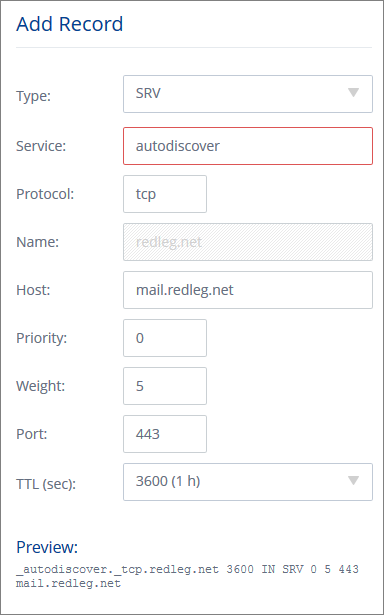
So login to 1and1 and go to the new Domain Centre, choose your domain and click Edit DNS Settings. At the bottom under 'TXT, SPF and SRV Records' click Add Record. It looks like this picture.

The standard advice is to create a record with this info:
   Service: _autodiscover
   Protocol: _tcp
   Port Number: 443
   Host: remote.yourdomain.com

However if you add _autodiscover you'll get an error ... This field contains invalid characters. The following characters are valid: 'a-Z', '0-9', '*', '-', '+'.

The trick is to remove the underscore at the start for both autodiscover and tcp. If you look at the preview at the bottom, 1and1 are automatically adding the underscore. 

Also note you need to click Add and then click Save, to create the record.

Monday, 16 March 2015

Shared printer keeps going offline after a few minutes on Windows Server

Sometimes its just the simple things ... AND you keep forgetting the fix. The copier company has just been and installed a shiny new Toshiba, looks loverly. Installed x86 / x64 drivers on the server, setup the printers, shared on the network, installed on a couple of PCs and watched as the printers promptly went offline again.

Restart the Print Spooler, come back online, wait a few minutes, and they're offline again. Aaargh.

Oh yes the fix - right-click on the server printer and choose Properties (or Printer Properties on newer versions of Windows Server) find the Ports tab, click Configure Port and

make sure SNMP is turned OFF

Friday, 12 December 2014

Uninstall Exchange Server 2010 SP3 Rollup 8 requires msexchange.msi

Having been caught with an SBS 2011 server that had the Exchange Server 2010 Service Pack 3 Rollup 8 loaded, just before Microsoft withdrew that update. Apparently it caused connection problems with Outlook clients, although we had no reported issues.

Before you start make sure you've downloaded Exchange 2010 Service Pack 3 and run it, so that its unpacked in a handy directory.

Going into Control Panel > Programs > View Installed Updates, you should see Exchange 2010 SP3 Rollup 7 and Rollup 8.

Select and uninstall Rollup 8. It takes a while to complete but will prompt for the location of msexchange.msi. This is actually the original  SP3 installer, not anything to do with RU7 which is what you'd expect. So when it prompts, browse to the SP3 directory mentioned above, where you already unpacked the files, and choose that msi file.

The RU8 will uninstall and appear to leave RU7 on the updates list, however in reality your Exchange server is now all the way back at SP3 with no Rollups at all.

Reinstall Exchange 2010 SP3 RU7 to bring it back up to date - and wait for MS to reissue RU8.

Bad week for faulty updates!

Monday, 8 December 2014

Offline Files error - 0x80070718 Not enough quota is available to process this command

I was copying files from an old PC to a Win7 64 bit laptop for a client with an SBS2011 server. The laptop was at home, offline, when it started warning about not being able to copy any more files - to be fair there were 20GB of photos involved.

Those laptops are setup to use Offline Files, so the Documents folder is available away from the office. Sounds an easy one, the SBS2011 server has a 2GB file quota for users by default. I checked it was turned off ok, then connected via VPN, tried another copy, still no luck. Double-checked that setting, turned it on and off, again no luck. Had to be something else - not as obvious unfortunately.

Tracked it down to a local limit on the laptop - the offline files disk usage limit was too low. Look in Control Panel > Sync Center > Offline Files > Manage Offline Files > Disk Usage > Change Limits

A more useful error message would have saved a bit of time there.

Tuesday, 21 October 2014

Another obscure Trustwave PCI scan fail - SBS 2011 fails CVE-2010-3332 / MS10-070, vulnerability in ASP.NET Could Allow Information Disclosure

After clearing up the SharePoint issues, there was just one remaining failure issue in the Trustwave PCI scan of an SBS 2011 server.

The fix turned out to be running the .NET Framework Cleanup Tool from Aaron Stebner at Microsoft, and removing .NET 1.0 and 1.1.

There's some more detailed discussion over at Technet

Monday, 20 October 2014

SharePoint 2010 on SBS 2011 failing Trustwave PCI scan (aka WSS_Search SPSearchDatabase Database is too old)

[ bonus points - that's got to be the biggest post title yet :-) ]

An SBS 2011 server, all patched up with the latest Microsoft Update fixes failed a Trustwave PCI security scan. When we looked at the detail most of the fail points were around SharePoint vulnerabilities.

Looking at the SharePoint Central Administration console, the Health Analyzer was throwing up warnings about out of date databases and upgrades required. they're no entirely straightforward because there's a difference between content databases and other databases.

With SharePoint updates you do need to run the upgrade tool sometimes after Microsoft Updates have been loaded, to get the database to upgrade too.

Start a Command Shell with administrative rights (or the SharePoint PowerShell) and run this command;
PSConfig.exe -cmd upgrade -inplace b2b -force -cmd applicationcontent -install -cmd installfeatures

That cleared all but one of the Health Analyzer warnings for us. The remaining one was the "WSS_Search SPSearchDatabase Database is too old" or more strictly, WSS_Search_servername. We had trouble tracking down that database GUID to issue a PS upgrade, as mentioned on the Technet forum.

Restarting services and rebooting didn't seem to clear either. The only info we could Google was the upgrade command above. In the end, having run the command repeatedly, the database upgraded and the warning cleared. It appeared to take 2-3 repeats of that command before WSS_Search was up to date.

Let you know about the PCI re-scan, I've just requested it ...

Friday, 21 October 2011

Unexpected shutdown after restart of SBS 2011 on Hyper-V with Remote Desktop

Got a client with Small Business Server (SBS) 2011 running on Hyper-V Server Core 2008 R2. I always remote in to load updates by using Remote Desktop (or Terminal Services client or Remote Desktop Services or Client or whatever its called this year)

I noticed this particular server always gives an Unexpected Shutdown after I click Restart once the updates are loaded. Also if I manually choose to Restart.

Couldn't see what was causing it until I came across this thread where a load of people with Blackberry Enterprise Server were having the same problem (this is a Dell Poweredge by coincidence too).
http://social.technet.microsoft.com/Forums/en/winservergen/thread/d10b8ba4-5b1a-440f-bc3c-2e8d02d10896

Scroll most of the way down for the post from JakesRNC. Its a quick and dirty fix but does the job. Putting 'net stop "Blackberry Controller" in the shutdown script for the server with Group Policy.


On the server,
Start > Run > gpedit.msc
Computer Config > Windows Settings > Scripts > Shutdown
Add a script with
   name = net
   parameters = stop "Blackberry Controller"

Thursday, 22 September 2011

IE 9 won't open or save attachment in OWA webmail on SBS

That new locked down IE9 is giving me hell on the SBS servers. Latest was to stop me saving a licence file on a remote server I was logged into. No errors, just wouldn't open or save or save as.

Messed with security xones, trusted certificates, activex filtering

Found the answer on Andy Grogan's blog

Internet Explorer > Internet Options > Advanced
scroll most of the way down the list, and untick this option
Do not save encrypted pages to disk option


Wednesday, 16 February 2011

SBS 2011 undeliverable local email after migration, 0x8004010F

Just completed an SBS 2011 migration from SBS 2003 using the Microsoft method. Two of the mailboxes failed to transfer correctly and I had to manually create and import them. Subsequently some staff were unable to email one of those mail accounts.

They received an undeliverable error which showed the new server name but trying to route to the old 'First Administrative Group' on the 2003 server. Download Offline Address Book gave error 0x8004010F, not found.

Creating a new OAB in 2010 Exchange Management Console didn't appear to fix the problem. Found the key bit of info here
http://forums.msexchange.org/fb.aspx?m=1800473258
Create the new OAB with a different name. Then allocate it to the Mailbox Database. Going back to Outlook and clicking Download Address Book worked straight off and email routing was successful.

Trust 1&1 Internet for your domain name registration, from only £1.99/year!. Check now!